SnapLayouter class new in Git master
#include <Magnum/Ui/SnapLayouter.h>
Snap layouter.
Allows explicitly snapping particular nodes to corners or edges of other nodes as well as common row and column layouts with size propagation.
Setting up a snap layouter instance
If you create a UserInterfaceGL with a theme and don't exclude ThemeFeature::
ui.setSnapLayouterInstance(
    Containers::pointer<Ui::SnapLayouter>(ui.createLayouter()));
In comparison, if you want to set up a custom snap layouter that's independent of the one exposed through UserInterface::
Ui::SnapLayouter& layouter = ui.setLayouterInstance(
    Containers::pointer<Ui::SnapLayouter>(ui.createLayouter()));
Afterwards, with either of the above, assuming AbstractUserInterface::
Core concepts
Internally, the layout calculation works with nodes being snapped to target nodes according to a combination of Snap values. With the target node shown as the blue rectangle below, snapping to its edges and corners can be achieved by combining Snap::
Additionally, it's possible to make the snapped node fill the whole edge using Snap::
The layout by default takes into account margin between nodes and padding inside nodes, as supplied for example by the LayoutLayer. In the diagram below, the blue rectangle has both a padding, shown as a yellow outline outside, and margin, shown as a green outline inside, other nodes have just paddings. Neighboring padding and margins collapse together, picking the larger of the two.
In rare cases it may be needed to ignore the padding and margin, which can be done by specifying Snap::
Note that in the above diagram the margins and paddings are the same for all sides for simplicity, however they can be specified differently for each side. See documentation of LayoutLayer for more examples.
Adding and removing layouts
An explicitly snapped layout is added by calling addExplicit() with a NodeHandle to which the layout is assigned, Snaps describing how to snap the node and a target LayoutHandle to which to snap. The target layout has to be either a sibling or a parent layout, and passing LayoutHandle::popup node with a concrete size is centered inside the UI (where empty Snaps mean center), an accept child node is placed to the bottom right corner of it, and a reject to the left next to the accept.
Ui::NodeHandle popupNode = ui.createNode({}, {400, 250});
Ui::NodeHandle acceptNode = ui.createNode(popupNode, {-10, -10}, {150, 50});
Ui::NodeHandle rejectNode = ui.createNode(popupNode, {}, {150, 50});

Ui::LayoutHandle popup = layouter.addExplicit(popupNode,
                                        Ui::Snaps{}, Ui::LayoutHandle::Null);
Ui::LayoutHandle accept = layouter.addExplicit(acceptNode,
                                        Ui::Snap::BottomRight, popup);
Ui::LayoutHandle reject = layouter.addExplicit(rejectNode, Ui::Snap::Left, accept);
Note that Snap::popup node that's a child of the UI it's being snapped to, and accept which is a child of the popup it's being snapped to. You can pass Snap::{-10, -10} in case of accept, it's added to the final layout offset, and affects also dependent layouts. When visualizing node placement, for example with Ui::

SnapLayouter layouts are unique, meaning a particular node can have only at most one layout from given layouter instance assigned. This in turn means you don't strictly need to remember a LayoutHandle in order to use it later, but can retrieve it back from its NodeHandle using AbstractUserInterface::
Ui::LayouterDataHandle popup = ui.nodeUniqueLayout(popupNode, layouter);
Layouts can be subsequently removed either as a consequence of removing the node they're assigned to, or by calling remove(). Note that only layouts that don't have sibling layouts explicitly snapped to them can be removed — i.e., while the reject layout or its node can be removed, attempting to remove the accept layout is an error because reject would then have nowhere to snap to.
Implicitly snapped layouts
While explicit snapping offers the most flexibility, it may get tedius when forming long chains of snapped nodes. Insertion or removal of a layout in the middle of such a chain also isn't possible. An alternative approach in such cases is specifying an implicit child snap using setChildSnap(), and then calling add() for all child nodes without specifying anything else for them:
Ui::NodeHandle contentsNode = ui.createNode(popupNode, {}, {});
Ui::NodeHandle titleNode = ui.createNode(contentsNode, {}, {300, 30});
Ui::NodeHandle detailsNode = ui.createNode(contentsNode, {}, {300, 40});

Ui::LayoutHandle contents = layouter.addExplicit(contentsNode, Ui::Snaps{}, popup);
layouter.setChildSnap(contents, Ui::Snap::Bottom|Ui::Snap::FillX);

/* Implicit child layouts */
Ui::LayoutHandle title = layouter.add(titleNode);
Ui::LayoutHandle details = layouter.add(detailsNode);
In the above snippet, a contents layout is explicitly snapped to the center of the popup, and inside a title and details are placed. The child snap for those is configured so that subsequent children will be added to the bottom of the previous and fill the parent horizontally. The result is the following:

By default new child layouts are appended after all previous, insertion in the middle can be done by passing a LayoutHandle to the add() function, saying before* which existing layout to insert the new one. For example, inserting a subtitle between the title and details, which would then look like this:
Ui::NodeHandle subtitleNode = ui.createNode(contentsNode, {}, {300, 20});
Ui::LayoutHandle subtitle = layouter.add(subtitleNode, /*before*/ details);
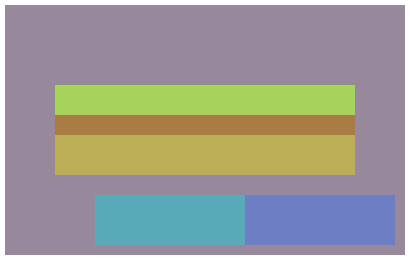
Unlike with explicitly snapped layouts, calling remove() on an implicitly snapped layout simply causes it to be removed from the sequence, with following layouts shifting into its place.
Finally, calling the implicit add() on a node that has no parent layout allows using this node as a target or parent of other layouts but doesn't cause the node offset to be affected by the layout process in any way. For example, if we'd want to have the original popup node movable by the user and placed to the center of the UI just initially, not changing its position from the layout in any way afterwards, such as when the window resizes, we'd do this instead:
ui.setNodeOffset(popupNode, (ui.size() - ui.nodeSize(popupNode))*0.5f);

Ui::LayoutHandle popup = layouter.add(popupNode);
Size propagation
You might have noticed that the contentsNode above didn't have any size specified. Its size was calculated automatically based on size of its (implicitly snapped) children, resulting in a size of {300, 90}. The same works for explicitly snapped children, however at the moment only the direct children are counted, nodes snapped to them as neighbors are not. The resulting size is always a maximum of the hardcoded node size and size of the contents including also any margin and padding as well as min sizes, coming for example from the LayoutLayer.
If size propagation is undesirable, for example when the contents should be clipped instead, pass SnapLayoutFlag::
Expanding child layouts to available space
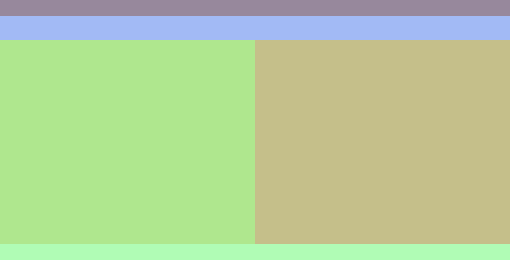
A counterpart to propagating child sizes to parent layouts is an ability to make child layouts occupy remaining available space. This is achieved using the add(NodeHandle, Snaps, LayoutHandle, SnapLayoutFlags) overload where you can pass Snap::
The following snippet shows a typical two-pane file manager layout. A root layout fills the whole window, with a fixed-height menubar and a toolbar at the top and statusbar at the bottom, and a main area spanning the remaining height. The area is then evenly split into left and right:
Ui::NodeHandle root = ui.createNode({}, {});
Ui::LayoutHandle rootLayout = layouter.addExplicit(root,
    Ui::Snap::Fill, Ui::LayoutHandle::Null);
layouter.setChildSnap(rootLayout, Ui::Snap::Bottom|Ui::Snap::FillX);

Ui::NodeHandle menubar = ui.createNode(root, {}, {0, 16});
Ui::NodeHandle toolbar = ui.createNode(root, {}, {0, 24});
layouter.add(menubar);
layouter.add(toolbar);

Ui::NodeHandle main = ui.createNode(root, {}, {});
Ui::LayoutHandle mainLayout = layouter.add(main, Ui::Snap::FillY);
layouter.setChildSnap(mainLayout, Ui::Snap::Right|Ui::Snap::FillY);

Ui::NodeHandle statusbar = ui.createNode(root, {}, {0, 16});
layouter.add(statusbar);

Ui::NodeHandle left = ui.createNode(main, {}, {});
Ui::NodeHandle right = ui.createNode(main, {}, {});
layouter.add(left, Ui::Snap::FillX);
layouter.add(right, Ui::Snap::FillX);
Margin propagation
With more complex UIs, the layouts commonly start nesting within each other, such as a column layout having row layouts inside each column:
/* A root column layout */
Ui::NodeHandle rootNode = …;
Ui::LayoutHandle root = layouter.add(rootNode);
layouter.setChildSnap(root, Ui::Snap::Bottom|Ui::Snap::FillX);

/* First row layout inside */
Ui::NodeHandle firstNode = ui.createNode(rootNode, {}, {});
Ui::LayoutHandle first = layouter.add(firstNode);
layouter.setChildSnap(first, Ui::Snap::Right);

/* Second row layout inside */
Ui::NodeHandle secondNode = ui.createNode(rootNode, {}, {});
Ui::LayoutHandle second = layouter.add(secondNode);
layouter.setChildSnap(second, Ui::Snap::Right);

/* Child nodes in both */
Ui::NodeHandle childNodes[]{
    ui.createNode(firstNode, {}, {200, 80}),
    ui.createNode(firstNode, {}, {200, 80}),
    ui.createNode(secondNode, {}, {140, 60}),
    ui.createNode(secondNode, {}, {140, 60}),
    ui.createNode(secondNode, {}, {140, 60}),
};
for(Ui::NodeHandle node: childNodes)
    layouter.add(node);
However, if the actual nodes within then define their own margins, as shown here by attaching a LayoutLayer data with a margin to each, the margin will collapse as expected between neighboring nodes, but not across layouts:
Ui::LayoutLayer& layoutLayer = …;
/* A single style with a 20-unit margin around the node */
layoutLayer.setStyle({}, {}, {}, {}, {Vector4{20.0f}});

/* Apply it to all children */
for(Ui::NodeHandle node: childNodes)
    layoutLayer.create(0, node);
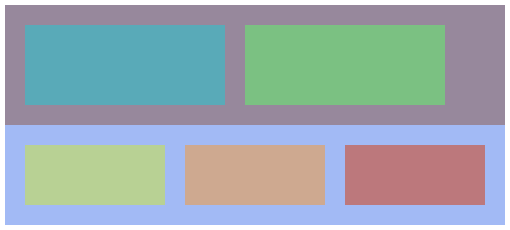
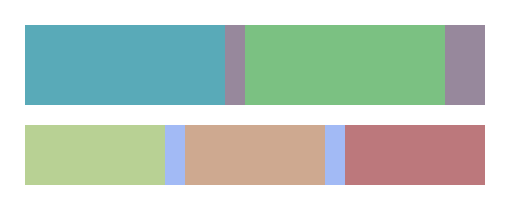
While that may be desirable in certain cases, such as when either row would be actually some visual frame around its items, often you may want to have the items evenly spaced. Applying SnapLayoutFlag::first and second makes the total margin of its children propagated outside — note how the respective visualization rectangles shrink to tightly wrap the contents —, where it gets collapsed between neighboring layouts:
layouter.addFlags(first, Ui::SnapLayoutFlag::PropagateMargin);
layouter.addFlags(second, Ui::SnapLayoutFlag::PropagateMargin);
Supported layout properties
At the moment, min size, padding and margin layout properties coming from LayoutLayer and other layers exposing LayerFeature::
High-level APIs for widget placement
To be written.
Base classes
- class AbstractLayouter new in Git master
- Base for layouters.
Constructors, destructors, conversion operators
- SnapLayouter(LayouterHandle handle) explicit
- Constructor.
- SnapLayouter(const SnapLayouter&) deleted
- Copying is not allowed.
- SnapLayouter(SnapLayouter&&) noexcept
- Move constructor.
Public functions
- auto operator=(const SnapLayouter&) -> SnapLayouter& deleted
- Copying is not allowed.
- auto operator=(SnapLayouter&&) -> SnapLayouter& noexcept
- Move assignment.
-
auto add(NodeHandle node,
LayoutHandle before = LayoutHandle::
Null, SnapLayoutFlags flags = {}) -> LayoutHandle - Add a layout assigned to given node.
- auto add(NodeHandle node, SnapLayoutFlags flags) -> LayoutHandle
- auto add(NodeHandle node, LayouterDataHandle before, SnapLayoutFlags flags = {}) -> LayoutHandle
- Add a layout assigned to given node, and before given layout assuming the layout belongs to this layouter.
-
auto add(NodeHandle node,
Snaps snap,
LayoutHandle before = LayoutHandle::
Null, SnapLayoutFlags flags = {}) -> LayoutHandle - Add a layout assigned to given node with snap adjustment.
- auto add(NodeHandle node, Snaps snap, SnapLayoutFlags flags) -> LayoutHandle
- auto add(NodeHandle node, Snaps snap, LayouterDataHandle before, SnapLayoutFlags flags = {}) -> LayoutHandle
- Add a layout assigned to given node with snap adjustment, and before given layout assuming the layout belongs to this layouter.
- auto addExplicit(NodeHandle node, Snaps snap, LayoutHandle snapTarget, SnapLayoutFlags flags = {}) -> LayoutHandle
- Add a layout snapping explicitly to given target.
- auto addExplicit(NodeHandle node, Snaps snap, LayouterDataHandle snapTarget, SnapLayoutFlags flags = {}) -> LayoutHandle
- Add a layout snapping explicitly to given target, assuming the target belongs to this layouter.
- void remove(LayoutHandle handle)
- Remove a layout.
- void remove(LayouterDataHandle handle)
- Remove a layout assuming it belongs to this layer.
Layout properties
- auto hasExplicitSnap(LayoutHandle handle) const -> bool
- Whether the layout has an explicit snap.
- auto hasExplicitSnap(LayouterDataHandle handle) const -> bool
- Whether the layout has an explicit snap assuming it belongs to this layouter.
- auto flags(LayoutHandle handle) const -> SnapLayoutFlags
- Layout flags.
- auto flags(LayouterDataHandle handle) const -> SnapLayoutFlags
- Layout flags assuming it belongs to this layouter.
- void setFlags(LayoutHandle handle, SnapLayoutFlags flags)
- Set layout flags.
- void setFlags(LayouterDataHandle handle, SnapLayoutFlags flags)
- Set layout flags assuming it belongs to this layouter.
- void addFlags(LayoutHandle handle, SnapLayoutFlags flags)
- Add layout flags.
- void addFlags(LayouterDataHandle handle, SnapLayoutFlags flags)
- Add layout flags assuming it belongs to this layouter.
- void clearFlags(LayoutHandle handle, SnapLayoutFlags flags)
- Clear layout flags.
- void clearFlags(LayouterDataHandle handle, SnapLayoutFlags flags)
- Clear layout flags assuming it belongs to this layouter.
- auto snap(LayoutHandle handle) const -> Snaps
- Snap adjustment or explicit layout snap.
- auto snap(LayouterDataHandle handle) const -> Snaps
- Snap adjustment or explicit layout snap assuming it belongs to this layouter.
- void setSnap(LayoutHandle handle, Snaps snap)
- Set snap adjustment or explicit layout snap.
- void setSnap(LayouterDataHandle handle, Snaps snap)
- Set snap adjustment or explicit layout snap assuming it belongs to this layouter.
- auto childSnap(LayoutHandle handle) const -> Snaps
- Snap for child layouts.
- auto childSnap(LayouterDataHandle handle) const -> Snaps
- Snap for child layouts assuming it belongs to this layouter.
- void setChildSnap(LayoutHandle handle, Snaps snap)
- Set snap for child layouts.
- void setChildSnap(LayouterDataHandle handle, Snaps snap)
- Set snap for child layouts assuming it belongs to this layouter.
Layout hierarchy introspection
- auto parent(LayoutHandle handle) const -> LayoutHandle
- Parent layout.
- auto parent(LayouterDataHandle handle) const -> LayoutHandle
- Parent layout assuming it belongs to this layouter.
- auto explicitSnapTarget(LayoutHandle handle) const -> LayoutHandle
- Explicit layout snap target.
- auto explicitSnapTarget(LayouterDataHandle handle) const -> LayoutHandle
- Explicit layout snap target node assuming it belongs to this layouter.
- auto firstChild(LayoutHandle handle) const -> LayoutHandle
- First child layout.
- auto firstChild(LayouterDataHandle handle) const -> LayoutHandle
- First child layout assuming it belongs to this layouter.
- auto firstExplicitSnap(LayoutHandle handle) const -> LayoutHandle
- First layout explicitly snapped to this one.
- auto firstExplicitSnap(LayouterDataHandle handle) const -> LayoutHandle
- First layout explicitly snapped to this one assuming it belongs to this layouter.
- auto previous(LayoutHandle handle) const -> LayoutHandle
- Previous layout.
- auto previous(LayouterDataHandle handle) const -> LayoutHandle
- Previous layout assuming it belongs to this layouter.
- auto next(LayoutHandle handle) const -> LayoutHandle
- Next layout.
- auto next(LayouterDataHandle handle) const -> LayoutHandle
- Next layout assuming it belongs to this layouter.
Function documentation
Magnum::
Constructor.
| Parameters | |
|---|---|
| handle | Layouter handle returned from AbstractUserInterface:: |
Magnum::
Move constructor.
Performs a destructive move, i.e. the original object isn't usable afterwards anymore.
LayoutHandle Magnum::
Add a layout assigned to given node.
| Parameters | |
|---|---|
| node | Node to assign the layout to |
| before | A layout to order before or LayoutHandle:: |
| flags | Layout flags |
| Returns | New layout handle |
The node is expected to not have a layout assigned from this layouter yet. If before is not LayoutHandle::node.
If node parent has a layout coming from this layouter, the positioning is done according to childSnap() defined by the parent layout, and the total size and padding of all child layouts then affects parent layout size and padding according to flags. If node parent doesn't have a layout coming from this layouter, the layout acts as a parent for child layouts or as a target for explicitly snapped layouts and isn't affected by layout calculation.
Use addExplicit() for explicitly snapping to given layout without taking childSnap() into account and without affecting the parent layout size.
Delegates to AbstractLayouter::
LayoutHandle Magnum::
This is an overloaded member function, provided for convenience. It differs from the above function only in what argument(s) it accepts.
LayoutHandle Magnum::
Add a layout assigned to given node, and before given layout assuming the layout belongs to this layouter.
Like add(NodeHandle, LayoutHandle, SnapLayoutFlags) but without checking that before indeed belongs to this layouter. See its documentation for more information.
LayoutHandle Magnum::
Add a layout assigned to given node with snap adjustment.
| Parameters | |
|---|---|
| node | Node to assign the layout to |
| snap | Snap adjustment, either empty or a combination of Snap:: |
| before | A layout to order before or LayoutHandle:: |
| flags | Layout flags |
| Returns | New layout handle |
Equivalent to calling add(NodeHandle, LayoutHandle, SnapLayoutFlags) followed by setSnap(LayoutHandle, Snaps) with snap. See their documentation for detailed description of all constraints.
LayoutHandle Magnum::
This is an overloaded member function, provided for convenience. It differs from the above function only in what argument(s) it accepts.
LayoutHandle Magnum::
Add a layout assigned to given node with snap adjustment, and before given layout assuming the layout belongs to this layouter.
Like add(NodeHandle, Snaps, LayoutHandle, SnapLayoutFlags) but without checking that before indeed belongs to this layouter. See its documentation for more information.
LayoutHandle Magnum::
Add a layout snapping explicitly to given target.
| Parameters | |
|---|---|
| node | Node to assign the layout to |
| snap | How to snap |
| snapTarget | Target layout to snap to or LayoutHandle::node to the UI itself |
| flags | Layout flags |
| Returns | New layout handle |
If node is root, snapTarget can be LayoutHandle::snapTarget is expected to be coming from the same layouter and assigned to either a parent or a sibling of node. If snapTarget is a parent, Snap::snap.
Note that explicitly snapped layouts aren't fully considered when calculating parent layout sizes and paddings and thus may overflow the parent node area in certain cases. In particular, only sizes of explicitly snapped child layouts are considered, not explicitly snapped neighbors. Additionally, if SnapLayoutFlag::
Delegates to AbstractLayouter::
LayoutHandle Magnum::
Add a layout snapping explicitly to given target, assuming the target belongs to this layouter.
Like addExplicit(NodeHandle, Snaps, LayoutHandle, SnapLayoutFlags) but without checking that snapTarget indeed belongs to this layouter. See its documentation for more information.
void Magnum::
Remove a layout.
Expects that handle is valid and has no child layouts or explicitly snapped layouts from the same layouter. To remove a layout that has dependent layouts, either remove the dependent layouts first or remove the whole node along with its children using Ui::
Delegates to AbstractLayouter::
void Magnum::
Remove a layout assuming it belongs to this layer.
Compared to remove(LayoutHandle) delegates to AbstractLayouter::
bool Magnum::
Whether the layout has an explicit snap.
Expects that handle is valid. Returns true if the layout was created using addExplicit(), false otherwise.
bool Magnum::
Whether the layout has an explicit snap assuming it belongs to this layouter.
Like hasExplicitSnap(LayoutHandle) const but without checking that handle indeed belongs to this layouter. See its documentation for more information.
SnapLayoutFlags Magnum::
Layout flags.
Expects that handle is valid.
SnapLayoutFlags Magnum::
Layout flags assuming it belongs to this layouter.
Like flags(LayoutHandle) const but without checking that handle indeed belongs to this layouter. See its documentation for more information.
void Magnum::
Set layout flags.
Expects that handle is valid. Initially, a layout has the flags that were passed to add() or addExplicit(), which are by default none.
If handle is snapped implicitly and snap(LayoutHandle) const contains Snap::
Calling this function causes LayouterState::
void Magnum::
Set layout flags assuming it belongs to this layouter.
Like setFlags(LayoutHandle, SnapLayoutFlags) but without checking that handle indeed belongs to this layouter. See its documentation for more information.
void Magnum::
Add layout flags.
Calls setFlags() with the existing flags ORed with flags. Useful for preserving previously set flags.
void Magnum::
Add layout flags assuming it belongs to this layouter.
Like addFlags(LayoutHandle, SnapLayoutFlags) but without checking that handle indeed belongs to this layouter. See its documentation for more information.
void Magnum::
Clear layout flags.
Calls setFlags() with the existing flags ANDed with the inverse of flags. Useful for removing a subset of previously set flags.
void Magnum::
Clear layout flags assuming it belongs to this layouter.
Like addFlags(LayoutHandle, SnapLayoutFlags) but without checking that handle indeed belongs to this layouter. See its documentation for more information.
Snaps Magnum::
Snap adjustment or explicit layout snap.
Expects that handle is valid. Note that for explicitly snapped layouts, if explicitSnapTarget() is assigned to a node that's a parent of handle node, Snap::
Snaps Magnum::
Snap adjustment or explicit layout snap assuming it belongs to this layouter.
Like snap(LayoutHandle) const but without checking that handle indeed belongs to this layouter. See its documentation for more information.
void Magnum::
Set snap adjustment or explicit layout snap.
Expects that handle is valid.
If handle is snapped implicitly, it's expected to have a non-null parent layout. The snap is then expected to be either empty or a combination of Snap::snap, the layout expands to available width, if childSnap() of parent layout is vertical and Snap::snap, the layout expands to available height. Other than that, Snap::
If handle has an explicit snap, snap can be anyhting. Note that in that case, if explicitSnapTarget() is assigned to a node that's a parent of handle node, Snap::
Calling this function causes LayouterState::
void Magnum::
Set snap adjustment or explicit layout snap assuming it belongs to this layouter.
Like setSnap(LayoutHandle, Snaps) but without checking that handle indeed belongs to this layouter. See its documentation for more information.
Snaps Magnum::
Snap for child layouts.
Expects that handle is valid.
Snaps Magnum::
Snap for child layouts assuming it belongs to this layouter.
Like childSnap(LayoutHandle) const but without checking that handle indeed belongs to this layouter. See its documentation for more information.
void Magnum::
Set snap for child layouts.
Expects that handle is valid and that snap produces a non-overlapping purely horizontal or vertical order. Default is Snap::
Calling this function causes LayouterState::
void Magnum::
Set snap for child layouts assuming it belongs to this layouter.
Like setChildSnap(LayouterDataHandle, Snaps) but without checking that handle indeed belongs to this layouter. See its documentation for more information.
LayoutHandle Magnum::
Parent layout.
Expects that handle is valid and doesn't have an explicit snap. Layouts with an explicit snap are not following any parent/child hierarchy, instead they have a snap target exposed by explicitSnapTarget(). If there was no layout assigned to the parent node at the time handle was created, or handle is assigned to a root node, returns LayoutHandle::
Similarly to node() and explicitSnapTarget(), the snap cannot be changed after creation as it could break internal constraints.
LayoutHandle Magnum::
Parent layout assuming it belongs to this layouter.
Like parent(LayoutHandle) const but without checking that handle indeed belongs to this layouter. See its documentation for more information.
LayoutHandle Magnum::
Explicit layout snap target.
Expects that handle is valid and has an explicit snap. Layouts with implicit snap are following a parent/child hierarchy and expose a parent(). Returns LayoutHandle::
Similarly to node() and parent(), the target cannot be changed after creation as it could break internal constraints.
LayoutHandle Magnum::
Explicit layout snap target node assuming it belongs to this layouter.
Like explicitSnapTarget(LayoutHandle) const but without checking that handle indeed belongs to this layouter. See its documentation for more information.
LayoutHandle Magnum::
First child layout.
Expects that handle is valid. If the layout has no children or if all nested layouts have an explicit snap, returns LayoutHandle::
LayoutHandle Magnum::
First child layout assuming it belongs to this layouter.
Like firstChild(LayoutHandle) const but without checking that handle indeed belongs to this layouter. See its documentation for more information.
LayoutHandle Magnum::
First layout explicitly snapped to this one.
Expects that handle is valid. If no other layouts are explicitly snapped to this layout, returns LayoutHandle::
LayoutHandle Magnum::
First layout explicitly snapped to this one assuming it belongs to this layouter.
Like firstExplicitSnap(LayoutHandle) const but without checking that handle indeed belongs to this layouter. See its documentation for more information.
LayoutHandle Magnum::
Previous layout.
Expects that handle is valid. If the handle doesn't have an explicit snap, returns a previous sibling with the same parent() in layout order. If the handle has an explicit snap, returns a previous layout with the same explicitSnapTarget(), but their relative order doesn't affect the layouting result in any way. If the layout is first in given list, returns LayoutHandle::
LayoutHandle Magnum::
Previous layout assuming it belongs to this layouter.
Like previous(LayoutHandle) const but without checking that handle indeed belongs to this layouter. See its documentation for more information.
LayoutHandle Magnum::
Next layout.
Expects that handle is valid. If the handle doesn't have an explicit snap, returns a next sibling with the same parent() in layout order. If the handle has an explicit snap, returns a next layout with the same explicitSnapTarget(), but their relative order doesn't affect the layouting result in any way. If the layout is last among its siblings, returns LayoutHandle::
LayoutHandle Magnum::
Next layout assuming it belongs to this layouter.
Like next(LayoutHandle) const but without checking that handle indeed belongs to this layouter. See its documentation for more information.